A practical comparison
Is WhatsApp Business enough for a growing business?
WhatsApp has become an important communication channel for businesses in India. Companies use it to answer product enquiries, share quotations, coordinate orders and respond to customer support requests.
As a business grows, however, managing every conversation through the same app can become challenging. Messages may be missed, employees may duplicate work, customer information can become difficult to organize and important sales follow-ups may be forgotten.
This leads to a common question: Should a business continue with WhatsApp Business, or move to WhatsApp CRM software? The answer depends on the number of customer conversations, employees involved and the level of customer-management workflow required.
01 / Messaging app
What is WhatsApp Business?
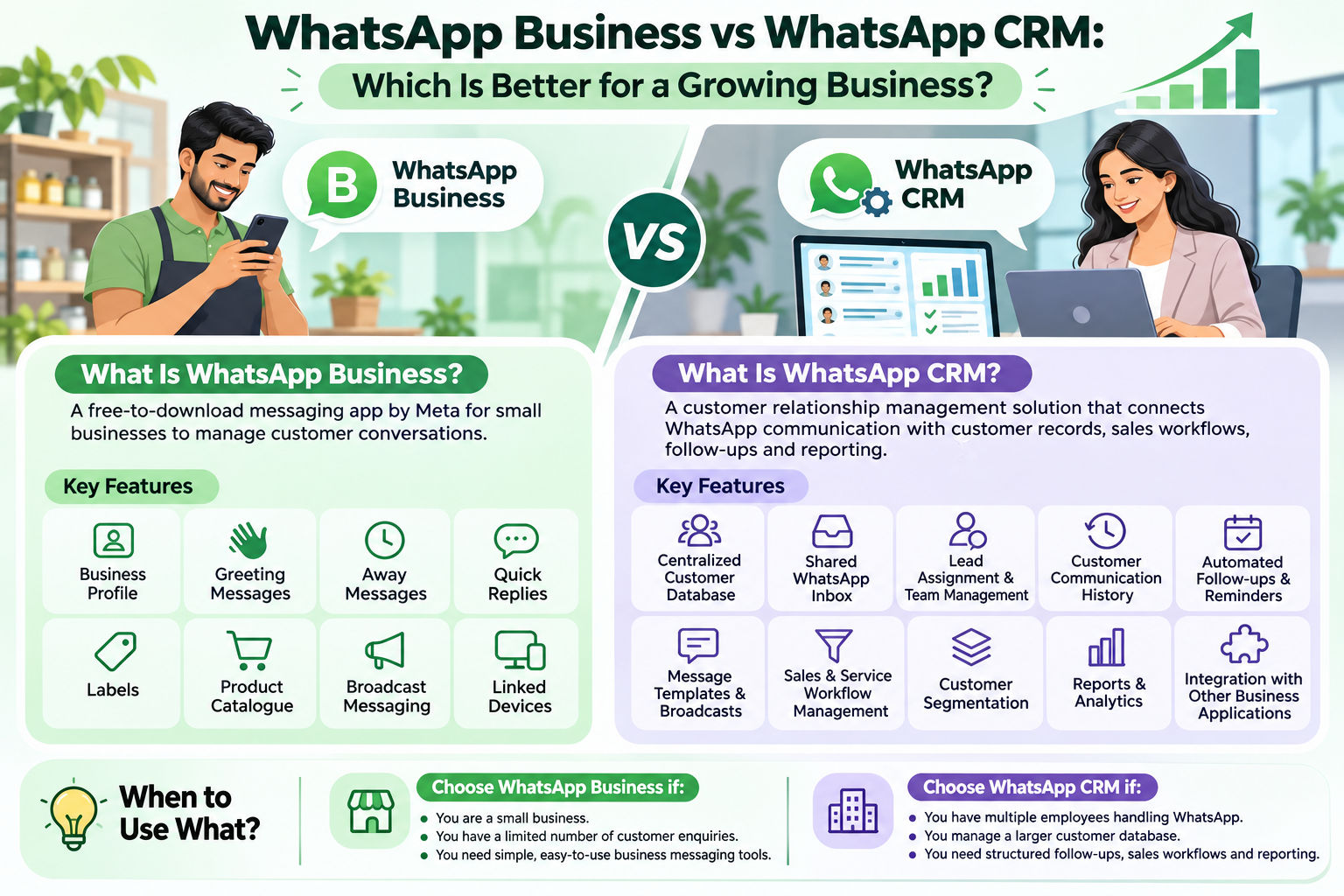
WhatsApp Business is a messaging application from Meta designed to help small businesses communicate with customers. Businesses can create a professional profile and use a range of tools to manage everyday conversations.
Business profile
Add your business name, logo, description, address, business hours, email and website details.
Greeting and away messages
Set automated welcome messages and away replies for common availability situations.
Quick replies and labels
Save frequently used responses and organize conversations with labels.
Product catalogue
Showcase products and services so customers can browse available offerings.
Broadcast and linked devices
Use supported broadcast features and linked-device options, subject to current availability, eligibility and limits.
These features make WhatsApp Business a practical starting point for individual business owners and small shops with a manageable number of customer conversations. Meta also offers expanded multi-agent access through certain eligible offerings, so it is not accurate to assume every WhatsApp Business setup is restricted to one device or one employee.
02 / Customer management
What is WhatsApp CRM software?
WhatsApp CRM software connects WhatsApp communication with a customer relationship management system. Instead of treating each conversation as an isolated chat, the CRM can associate conversations with customer details, sales enquiries, employee responsibilities and follow-up activities.
For example, imagine an automobile dealership receiving 50 WhatsApp enquiries in one day. The team needs to know which enquiries have been answered, which customers are waiting for quotations and which leads require another follow-up. A configured CRM can organize those activities in a shared workflow.
Important: WhatsApp CRM is a category of business software, not a separate official WhatsApp application from Meta. Professional solutions commonly integrate with the WhatsApp Business Platform. Integration methods and capabilities vary by provider.
03 / Side-by-side comparison
WhatsApp Business vs WhatsApp CRM: Main differences
WhatsApp Business focuses on messaging and basic business communication. A WhatsApp CRM adds customer-management and business-workflow capabilities.
| Feature | WhatsApp Business | WhatsApp CRM |
|---|---|---|
| Business messaging | Yes | Yes, through configured integration |
| Business profile | Yes | Depends on integration |
| Customer records | Basic contact and chat organization | Centralized CRM records |
| Customer history | Chat history | Interaction history with additional CRM fields |
| Labels and segmentation | Basic labels | Advanced segmentation, depending on product |
| Multiple employees | Linked-device and eligible multi-agent options | Shared inbox and agent management, if supported |
| Chat assignment | Limited workflow | Conversation and lead assignment, if supported |
| Follow-up reminders | Basic messaging tools | Structured follow-up management |
| Automation | Greetings and away messages | Configurable workflows, subject to platform rules |
| Sales pipeline | Not a full sales CRM | Available in CRM products with lead management |
| Reporting | Basic messaging and eligible broadcast insights | Customer, team and activity reports, depending on product |
| Business integrations | Limited integration options | CRM and third-party integrations, depending on platform |
Exact capabilities depend on the WhatsApp app, account eligibility, Meta integration and CRM provider. Evaluate the actual product rather than assuming every CRM includes every feature.
04 / Customer information
Customer records: Individual chats vs a centralized database
WhatsApp Business helps teams organize chats and refer to previous messages. However, structured information such as purchase history, invoice references, warranty details, sales stages and assigned employees may need to be maintained separately.
A WhatsApp CRM can provide a customer profile with details such as name, mobile number, email, previous enquiries, purchase or service information, assigned employee, follow-up status and notes. Authorized employees can refer to the same record instead of maintaining separate contact lists.
A customer contacts a battery dealer about a replacement. In a chat-only workflow, the employee may need to search earlier messages or locate an invoice separately. In a CRM, the employee can review the customer's recorded purchase and follow-up information from the customer profile.
This helps make customer management more organized. The CRM can only show information that has been accurately recorded or synchronized.
05 / Employee coordination
Team handling: Linked devices vs a shared WhatsApp CRM inbox
Sales executives, support employees, service coordinators and managers may all need to communicate with customers as a business expands. WhatsApp Business provides linked-device functionality and eligible collaboration options. However, linked devices alone may not provide the complete employee-management workflow a growing team requires.
A multi-agent WhatsApp CRM can provide a shared team inbox where authorized employees access configured conversations. Depending on the platform, managers may assign enquiries, review pending conversations and monitor team activity.
- Enquiry received: A customer sends a message through the configured WhatsApp integration.
- Conversation organized: The message appears in the team's shared inbox.
- Employee assigned: A manager or configured workflow assigns the enquiry.
- Customer assisted: The employee responds and records the outcome.
- Next action tracked: The team can review pending tasks and follow-up responsibilities.
A shared inbox can be useful for retail stores, dealerships, distributors, service businesses and companies with dedicated sales and support teams.
06 / Sales workflow
Follow-ups: Manual reminders vs automated workflows
A customer conversation may need another action after a quotation, product discussion, service visit or initial enquiry. Without a structured follow-up process, callbacks and pending opportunities can be forgotten.
WhatsApp Business offers quick replies, labels, greeting messages and away messages. A CRM can connect customer records with tasks and reminders such as:
New enquiry
Record the enquiry and identify the employee responsible for responding.
Quotation follow-up
Schedule a callback after a quotation has been shared with a customer.
Service reminder
Organize service appointments, maintenance discussions and renewal reminders.
Pending customer action
Keep track of payment confirmation, requested callbacks and unresolved questions.
A typical workflow can be: Customer Enquiry → Lead Created → Employee Assigned → Quotation Shared → Follow-Up Scheduled → Customer Response → Sale Completed. A CRM can make the next action clearer, but it cannot guarantee that a customer will purchase.
07 / Business visibility
Reporting and analytics: Messaging insights vs business reports
WhatsApp Business provides basic messaging and certain broadcast insights. A business that needs sales pipeline visibility, employee-level workflow tracking or customer retention information may require an additional CRM system.
Enquiry and lead reports
Review total enquiries, new customers, lead stages and pending opportunities.
Employee activity
Review assigned enquiries, conversation activity and pending employee tasks where supported.
Follow-up visibility
Identify overdue callbacks, scheduled reminders and unresolved customer requests.
08 / Practical fit
Which businesses should use WhatsApp Business or WhatsApp CRM?
Small shops and individual business owners
WhatsApp Business may be sufficient when one person handles most enquiries, customer volume is manageable and basic labels and quick replies meet daily needs.
Retail shops and dealerships
Retailers and dealerships managing purchases, quotations, warranties and repeat enquiries may benefit from centralized records and organized follow-ups.
Automobile and battery dealerships
These businesses may need to maintain customer purchase details, warranty records, service requests and after-sales communication. A CRM that supports those workflows can help coordinate the work.
Water purifier and service businesses
Installation details, service schedules and AMC renewal reminders can be organized through a CRM with suitable service-management features.
Distributors and growing sales teams
Distributors and companies with several sales or support employees may benefit from shared inboxes, lead assignment and centralized customer information.
09 / Buying guide
How to choose the right WhatsApp CRM software in India
Before purchasing, evaluate the software against your real workflow and confirm the following:
Centralized customer database
Maintain customer contact details, notes, enquiry information and available interaction history in one place.
Shared team inbox
Allow authorized employees to handle configured WhatsApp conversations through a centralized team interface.
Lead assignment and tracking
Assign enquiries, record lead status and make the next responsible action clear to the team.
Follow-up reminders
Organize callbacks, quotation follow-ups, service reminders and other scheduled customer activities.
Templates and broadcasts
Manage supported templates and broadcast workflows while following applicable Meta messaging requirements.
Reports and analytics
Review customer activity, pending work and team workflows using the reports available in the selected CRM.
Also ask about official WhatsApp integration, onboarding and number configuration, user permissions, data export, backups, security, support, subscription fees, setup costs and Meta messaging charges. A useful CRM should solve actual business problems rather than simply advertise a long feature list.
10 / Platform basics
WhatsApp Business App vs WhatsApp Business Platform vs WhatsApp CRM
WhatsApp Business App: The application designed to help small businesses manage everyday customer communication.
WhatsApp Business Platform: Meta's business messaging platform that allows businesses to integrate WhatsApp communication into software systems and manage conversations at scale.
WhatsApp Business API: A commonly used term for programmatic access to WhatsApp Business messaging capabilities, now generally referred to under the WhatsApp Business Platform.
WhatsApp CRM: A customer relationship management system that connects WhatsApp conversations with customer data, employee workflows, reminders and business reporting.
Important WhatsApp messaging requirements
Businesses must understand the official WhatsApp policies before implementing automation or bulk messaging. Depending on the messaging scenario, requirements include obtaining appropriate permission, respecting opt-out requests, using approved templates for business-initiated Platform messages and following the applicable 24-hour customer service window and pricing rules. Review the current WhatsApp Business Messaging Policy before configuring automated messaging.
11 / Alfa Tech Industries
How Alfa WhatsApp CRM helps growing businesses
Alfa WhatsApp CRM by Alfa Tech Industries is designed to bring customer management, WhatsApp communication, follow-ups, reminders and business reporting into a centralized platform. Rather than managing customer information across disconnected spreadsheets, notebooks and chat conversations, businesses can organize customer activities using a dedicated CRM workflow.
It is designed for dealer and service businesses such as battery dealers, automobile dealerships, water purifier dealers, retail stores, wholesale businesses and maintenance companies. Suitability depends on the specific workflow, configuration and plan required.
Alfa Tech Industries · Madurai, Tamil Nadu
Supporting businesses in Tamil Nadu and across India with business software and CRM solutions.
The next step
Choose a WhatsApp solution that fits your business workflow
WhatsApp Business is an excellent starting point for small businesses that need simple customer communication. As enquiries increase and more employees become involved, a dedicated WhatsApp CRM can add centralized customer records, shared inboxes, follow-up workflows and business reporting.
If your team is managing customers through individual chats and spreadsheets, explore Alfa WhatsApp CRM to see whether its customer-management and communication workflows match your requirements.
Quick answers
Frequently asked questions about WhatsApp Business vs WhatsApp CRM
What is the difference between WhatsApp Business and WhatsApp CRM?
WhatsApp Business is a messaging application with business profiles, quick replies, labels, catalogues and other communication features. WhatsApp CRM is customer-management software that connects WhatsApp conversations with customer records, team workflows, follow-ups and business reporting.
Is WhatsApp CRM better than WhatsApp Business?
A WhatsApp CRM is more suitable when a business needs centralized customer records, multiple employee workflows, scheduled follow-ups and operational reports. WhatsApp Business may be enough for an individual or small business with simple communication requirements.
Can multiple employees use WhatsApp CRM?
Yes. A multi-agent WhatsApp CRM can allow authorized employees to manage customer conversations through a shared team inbox. User limits and permissions depend on the CRM provider and subscription.
Can I manage customer details using WhatsApp CRM?
Yes. Depending on the platform, a WhatsApp CRM can maintain customer names, mobile numbers, enquiry details, notes, purchase information and interaction history.
Does WhatsApp CRM support automated follow-ups?
Many CRM platforms support scheduled tasks, reminders and configured messaging workflows. Capabilities depend on the product, integration and applicable WhatsApp messaging rules.
Is WhatsApp Business free?
The WhatsApp Business app is free to download and use for its core app functionality. Optional services may involve charges. The WhatsApp Business Platform and third-party CRM services have their own applicable pricing.
Does WhatsApp CRM require the WhatsApp Business Platform?
Many advanced WhatsApp CRM integrations use the WhatsApp Business Platform and its APIs. Integration methods vary, so confirm the exact method used by the provider.
Can WhatsApp CRM track employee performance?
Some CRM platforms provide employee-wise assignments, conversation activity and operational reports. The available metrics depend on the system and its configuration.
Is WhatsApp CRM useful for small businesses in India?
It can be useful for small businesses that manage several enquiries, work with multiple employees or need consistent follow-ups. Choose a solution based on customer volume, budget and workflow requirements.
Can WhatsApp CRM help increase sales?
A CRM can help organize enquiries and follow-ups, creating better-managed sales opportunities. It cannot guarantee revenue growth, which also depends on customer demand, pricing, product quality and sales execution.
Can WhatsApp CRM manage customer broadcasts?
Some CRM solutions provide broadcast management through configured WhatsApp integrations. Businesses must follow applicable customer permission, template, quality and messaging policies.
What is the best WhatsApp CRM software for dealers?
Look for centralized customer records, team communication, lead assignment, follow-up reminders, service or warranty workflows and useful reporting. Confirm that the required capabilities are included in the provider’s plan.